
Note
Go to the end to download the full example code.
Custom tessellation deflection#
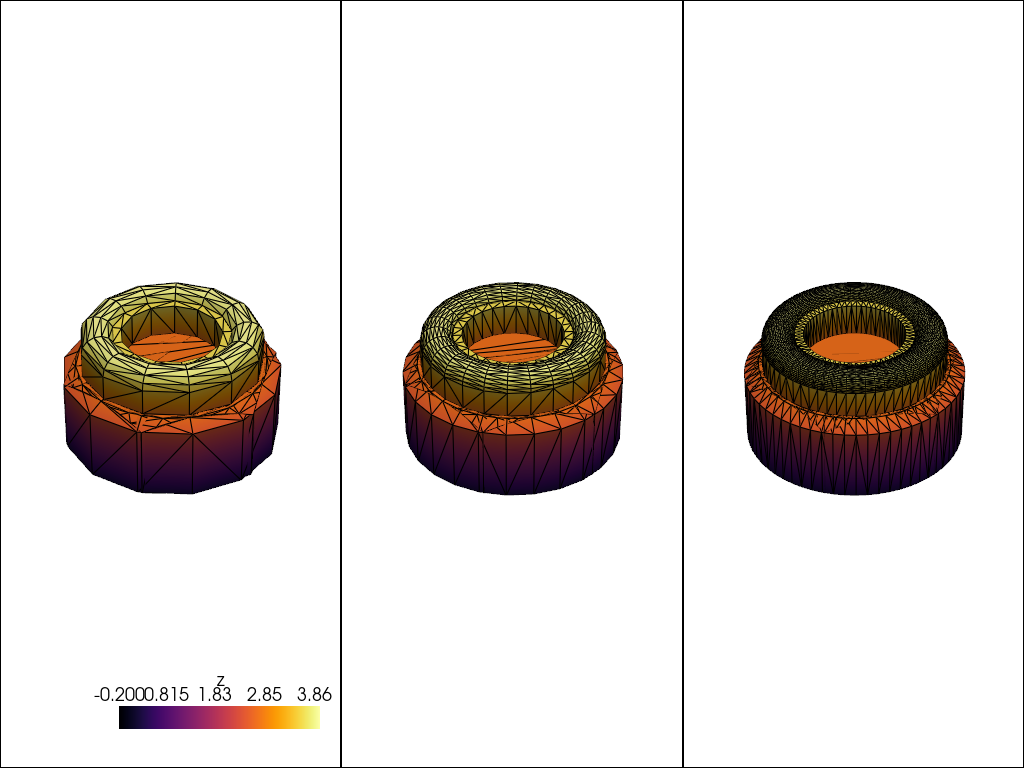
OCCT’s BRepMesh_IncrementalMesh exposes a linear and angular
deflection knob. Coarser deflection yields fewer triangles; finer
deflection yields smoother curves. read_step, read_brep,
read_fcstd, and the build123d / cadquery bridges all forward
these knobs.
The part is a real M3 nyloc lock nut from the FreeCAD parts library (CC-BY 3.0, FreeCAD-library contributors). Its helical thread and chamfers are exactly the curved features the deflection knob resolves, so the triangle count moves with the setting.
import pandas as pd
import pyvista as pv

import pyvista_cad
from pyvista_cad.examples import downloads
Tessellate the same real FCStd part at three deflection settings.
fcstd = downloads.fcstd_nut_path()
settings = [
    ('coarse', 0.5, 1.0),
    ('medium', 0.1, 0.5),
    ('fine', 0.02, 0.2),
]
meshes = {
    name: pyvista_cad.read_fcstd(fcstd, linear_deflection=lin, angular_deflection=ang)
    .combine()
    .extract_surface()
    for name, lin, ang in settings
}

pd.DataFrame(
    [
        {'setting': name, 'linear': lin, 'angular': ang, 'triangles': meshes[name].n_cells}
        for name, lin, ang in settings
    ]
)
/home/runner/work/pyvista-cad/pyvista-cad/examples/06_advanced/custom_tessellation.py:37: PyVistaFutureWarning: The default value of `algorithm` for the filter
`UnstructuredGrid.extract_surface` will change in the future. It currently defaults to
`'dataset_surface'`, but will change to `None`. Explicitly set the `algorithm` keyword to
silence this warning.
  .extract_surface()
Side by side with the camera locked across views.
pl = pv.Plotter(shape=(1, 3))
for i, name in enumerate(['coarse', 'medium', 'fine']):
    pl.subplot(0, i)
    mesh = meshes[name]
    mesh['z'] = mesh.points[:, 2]
    pl.add_mesh(mesh, scalars='z', cmap='inferno', show_edges=True, edge_color='black')
pl.link_views()
pl.show()
Total running time of the script: (0 minutes 0.873 seconds)