
Note
Go to the end to download the full example code.
CAD shape to tetrahedral FEA mesh#
Drive a CAD shape through gmsh to obtain a tetrahedral mesh suitable
for finite-element analysis, then bring the volumetric result back
into PyVista as an pyvista.UnstructuredGrid.
This imports a real STEP part, the NIST AM Bench 2022 LPBF bridge
specimen (public domain, https://doi.org/10.18434/mds2-2607),
directly into gmsh via gmsh.model.occ.importShapes, the canonical
way to move from CAD to FEA, and meshes the volume tetrahedrally.
import gmsh
import pandas as pd
import pyvista as pv

import pyvista_cad
from pyvista_cad.examples import downloads
Import the real STEP into gmsh’s OCC kernel and mesh the volume.
gmsh.initialize()
try:
    gmsh.model.add('part_fea')
    gmsh.model.occ.importShapes(downloads.step_part_path())
    gmsh.model.occ.synchronize()

    gmsh.option.setNumber('Mesh.MeshSizeMax', 2.0)
    gmsh.option.setNumber('Mesh.MeshSizeMin', 0.5)
    gmsh.model.mesh.generate(3)
    grid = pyvista_cad.from_gmsh('part_fea')
finally:
    gmsh.finalize()

# gmsh returns a mixed grid (vertex, line, triangle, tet). For a
# volumetric FEA mesh we only keep VTK_TETRA (cell type 10).
VTK_TETRA = 10
grid = grid.extract_cells(grid.celltypes == VTK_TETRA)
grid
Quality check: a healthy tet mesh has no zero-volume elements.
vols = grid.compute_cell_sizes(length=False, area=False, volume=True)['Volume']

pd.DataFrame(
    {
        'metric': ['min', 'mean', 'max'],
        'tet_volume': [vols.min(), vols.mean(), vols.max()],
    }
)
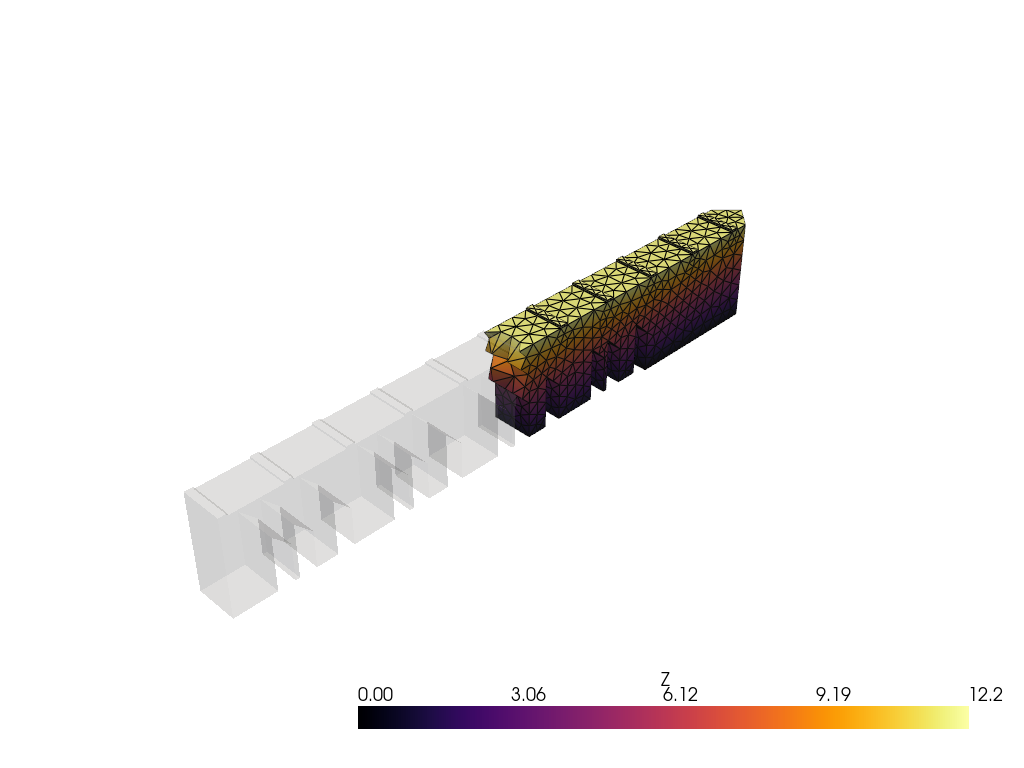
Slice through the part to expose the tet interior.
bnds = grid.bounds
clip = grid.clip(normal='x', crinkle=True)
clip['Z'] = clip.points[:, 2]

pl = pv.Plotter()
pl.add_mesh(grid, color='lightgray', opacity=0.15)
pl.add_mesh(clip, scalars='Z', cmap='inferno', show_edges=True, edge_color='black')
pl.show()
Total running time of the script: (0 minutes 0.884 seconds)