
Note
Go to the end to download the full example code.
CAD shape to signed-distance field#
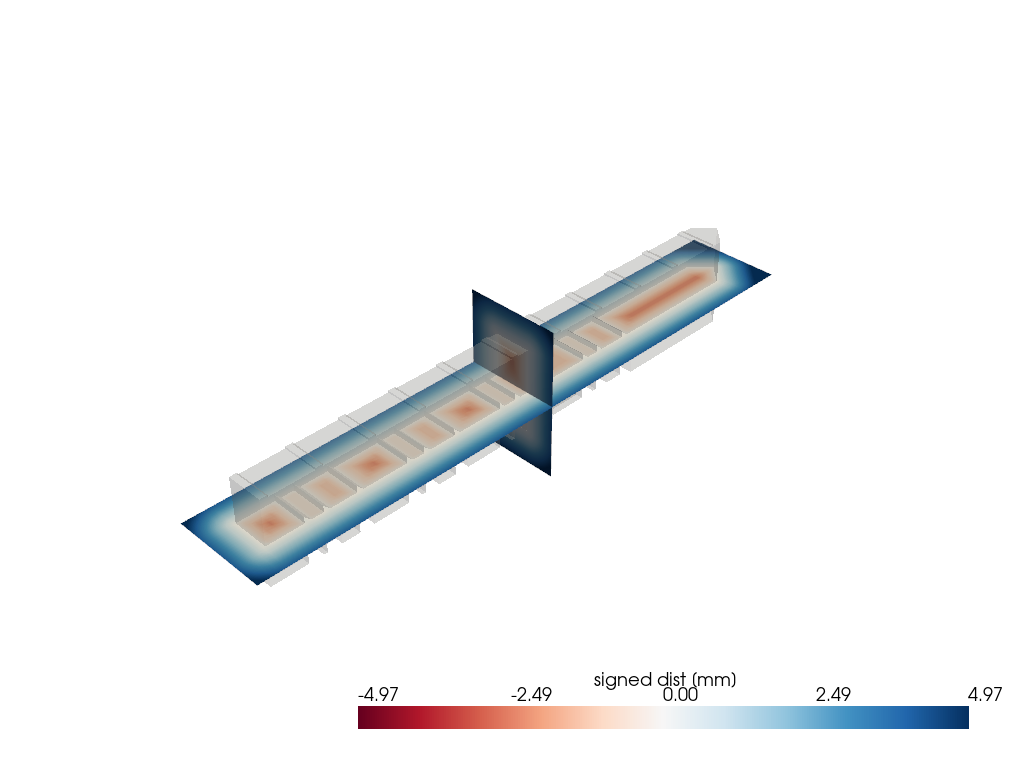
A tessellated CAD part drives a signed-distance volume directly
through PyVista’s compute_implicit_distance. The result is a
volumetric scalar field useful for collision queries, mesh morphing,
implicit modeling, or feeding marching-cubes-style reconstructions.
The part is a real STEP solid, the NIST AM Bench 2022 LPBF bridge specimen (public domain, https://doi.org/10.18434/mds2-2607). Its multi-leg structure gives the SDF interior real shape to slice through.
import numpy as np
import pandas as pd
import pyvista as pv

import pyvista_cad
from pyvista_cad.examples import downloads
Load the real STEP part as a surface.
part = pyvista_cad.read_step(downloads.step_part_path()).combine().extract_surface()
part
/home/runner/work/pyvista-cad/pyvista-cad/examples/05_workflows/cad_to_signed_distance.py:28: PyVistaFutureWarning: The default value of `algorithm` for the filter
`UnstructuredGrid.extract_surface` will change in the future. It currently defaults to
`'dataset_surface'`, but will change to `None`. Explicitly set the `algorithm` keyword to
silence this warning.
  part = pyvista_cad.read_step(downloads.step_part_path()).combine().extract_surface()
Build a uniform grid wrapping the part with a small margin.
Sample the signed distance into the volume.
Slice the SDF through two orthogonal planes to expose the interior field.
mid = bounds.mean(axis=1)
slc_z = grid.slice(normal='z', origin=mid)
slc_x = grid.slice(normal='x', origin=mid)
clim = (-float(np.percentile(np.abs(sdf), 95)), float(np.percentile(np.abs(sdf), 95)))

pl = pv.Plotter()
pl.add_mesh(part, color='lightgray', opacity=0.2)
pl.add_mesh(
    slc_z,
    scalars='implicit_distance',
    cmap='RdBu',
    clim=clim,
    scalar_bar_args={'title': 'signed dist [mm]'},
)
pl.add_mesh(slc_x, scalars='implicit_distance', cmap='RdBu', clim=clim, show_scalar_bar=False)
pl.show()
Total running time of the script: (0 minutes 0.717 seconds)