
Note
Go to the end to download the full example code.
build123d -> PyVista#
Tessellate a build123d solid with OCCT’s incremental mesher and wrap
the result as a pyvista.PolyData. The deflection knobs trade
mesh density for accuracy on curved faces.
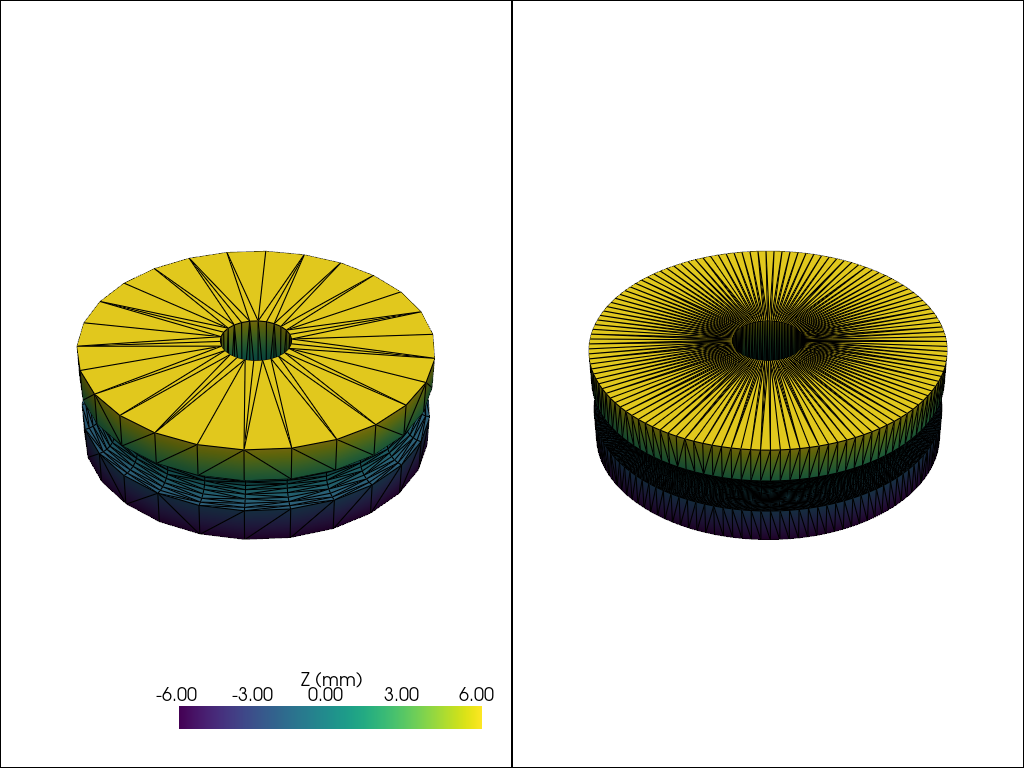
This example builds a real parametric pulley (a hub with a V-belt groove and a center bore) and sweeps the linear-deflection parameter so the impact of the mesher setting on a curved part is visible.
import build123d as b3d
import pyvista as pv

import pyvista_cad


def make_pulley(
    outer_r: float = 20.0,
    groove_r: float = 16.0,
    bore_r: float = 4.0,
    thickness: float = 12.0,
    groove_width: float = 4.0,
) -> b3d.Part:
    body = b3d.Cylinder(radius=outer_r, height=thickness)
    bore = b3d.Cylinder(radius=bore_r, height=thickness + 2)
    groove = b3d.Pos(0.0, 0.0, 0.0) * b3d.Torus(
        major_radius=outer_r, minor_radius=groove_width / 2
    )
    return body - bore - groove


pulley = make_pulley()
Coarse tessellation: low triangle count, visible facets.
coarse = pyvista_cad.from_build123d(pulley, linear_deflection=1.0)
coarse
Fine tessellation: smooth curves at the cost of triangle count.
fine = pyvista_cad.from_build123d(pulley, linear_deflection=0.05, angular_deflection=0.1)
fine
Render side by side so the mesher impact reads at a glance.
coarse['Z (mm)'] = coarse.points[:, 2]
fine['Z (mm)'] = fine.points[:, 2]

pl = pv.Plotter(shape=(1, 2))
pl.subplot(0, 0)
pl.add_mesh(coarse, cmap='viridis', show_edges=True, edge_color='black', scalars='Z (mm)')
pl.subplot(0, 1)
pl.add_mesh(fine, cmap='viridis', show_edges=True, edge_color='black', scalars='Z (mm)')
pl.link_views()
pl.show()
Total running time of the script: (0 minutes 0.467 seconds)